
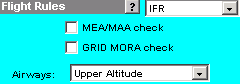
JetPlan provides three choices from which to select a flight rule: IFR, VFR, or Constrained. To choose a flight rule for your flight plan, select one of the options available in the Flight Rules list.

NOTE: IFR is the default rule for all flight plans except when your route selection involves the North Atlantic Tracks (NATs) option. In this case, the flight rule, Constrained, is your only choice.
After specifying the flight rule, you have the option of activating two other features, MEA/MAA and GRID MORA. Select the MEA/MAA box if you want JetPlan to consider and maintain a profile constraint based on these factors. Select the GRID MORA box if routing will deviate from airway structure and you want to maintain minimum flight altitudes.
The last item to consider under the Flight Rules section is the navigation database. JetPlan defaults to planning with high altitude route structure. In this case, the Airways list may be left untouched, as Upper Altitude should already be selected. Select Lower Altitude if you want JetPlan to use low altitude airway structure, available in CONUS (Area 1) and Europe (Area 2) only. Select European Mid-level if you want JetPlan to use mid-level structure (available in certain parts of Europe - Area 2 only).
NOTE: Both the lower and mid-level structure apply only to routes planned using Route Optimizer inputs.
Example:
For more information on this and other JetPlan features, go to the available online (PDF) documentation by clicking the following link: JetPlan Manual?