
In the Payload box, type the amount of payload to be transported. The value you enter must be within the defined limits for the aircraft. This entry is mandatory.
Example:
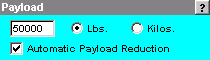
Click the Lbs or Kilos button, depending on which unit of measure you wish to employ.

CAUTION: Once a choice is selected, any other input requiring a unit of measure selection will default to this choice. If you should change the unit of measure on some other entry (e.g., fuel), that change will carry over to this entry. This could adversely affect the fuel or weight values you enter here or elsewhere.
Check the Automatic Payload Reduction box if you wish to employ the JetPlan autoweight feature. This feature instructs JetPlan to recalculate the flight plan if either a weight limit or the maximum fuel capacity is exceeded in the initial calculation.
For more information on this and other JetPlan features, go to the available online (PDF) documentation by clicking the following link: JetPlan Manual?